Cuta
Facial Expression Changer online

Facial Expression Changer

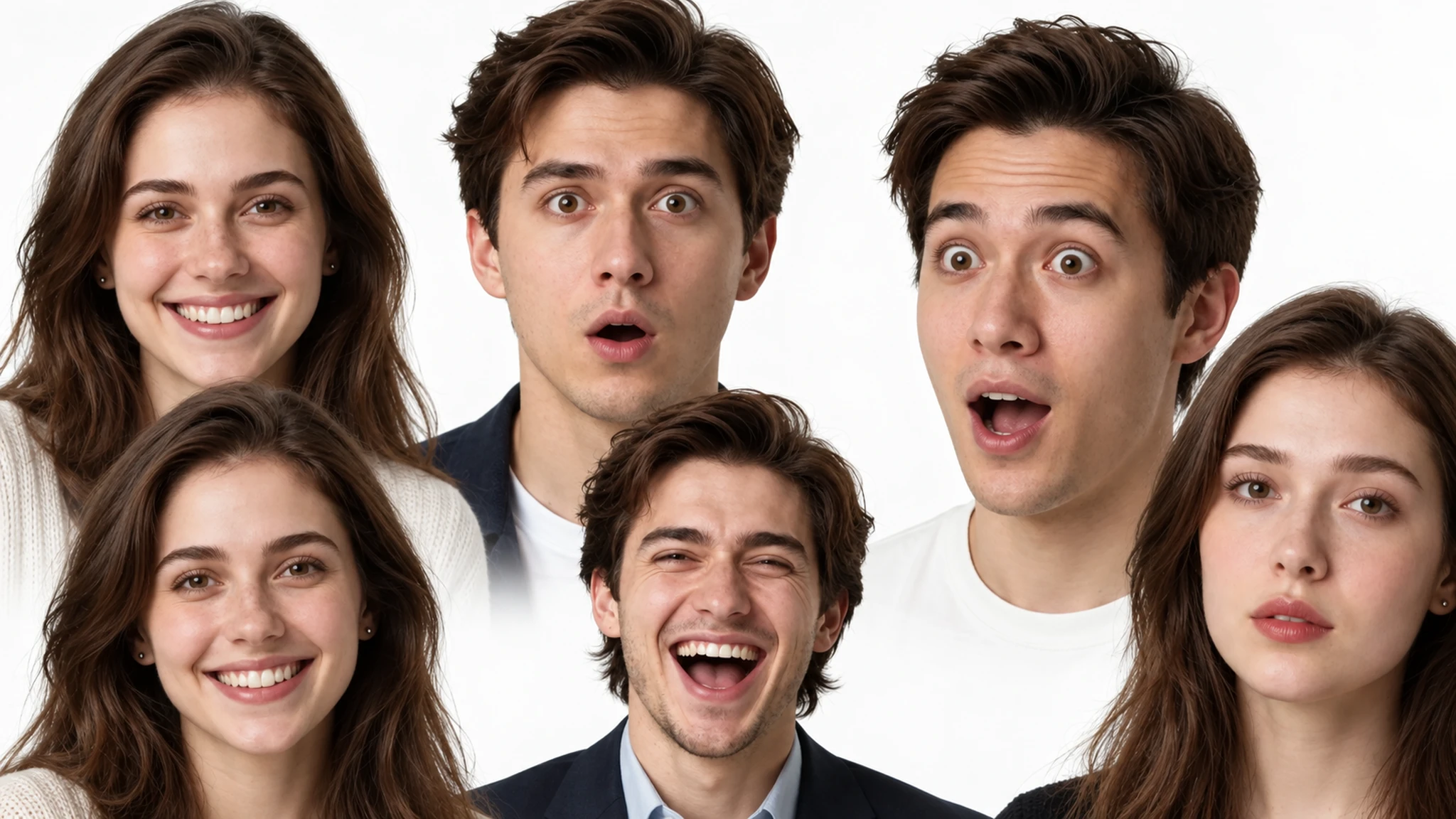
Change the facial expression in any photo with Cuta's AI facial expression changer. Smile, frown, laugh, wink, surprise — edit any expression in seconds while keeping the rest of the photo intact.

Approach
Manual
Cuta
Speed
Hours
Minutes
Consistency
Varies
Locked
Cost
High
Credits

How to Use the Facial Expression Changer

Facial Expression Changer

Facial Expression Changer
Step 01

Upload Your Photo

Open Cuta's image tools and upload the photo you want to edit. Selfies, headshots, group photos, full-body shots, AI-generated portraits, and characters from your library all work.

Facial Expression Changer

Facial Expression Changer
Step 02

Describe the New Expression

Type the expression you want — "warm genuine smile," "surprised with raised eyebrows," "calm and serious," "laughing out loud," "subtle smirk," "annoyed eye roll." If you're editing a group photo, name which person to change.

Facial Expression Changer

Facial Expression Changer
Step 03

Generate and Refine

Run the edit, preview the result, and refine if needed. Try a softer or more intense version of the same expression, or generate a few variations to pick from. The rest of the image stays untouched the entire time.

Try now

Key Features of the Facial Expression Changer

Facial Expression Changer

Facial Expression Changer

Change Any Expression on Command

Type the expression you want — "big genuine smile," "subtle smirk," "shocked surprise," "calm and serious," "laughing with eyes closed," "annoyed side-eye" — and the AI updates the face to match. The change lands on the eyes, mouth, and micro-expressions together, so the result feels natural instead of pasted-on.

Try it now


Facial Expression Changer

Facial Expression Changer

Identity-Preserving Edit

The point of the tool is that it's the same person, just expressing differently. Face shape, eye color, hair, skin tone, makeup, and lighting all stay locked. So a smile edit doesn't accidentally change the person's age, jawline, or hairstyle — it just gives them the expression you asked for.

Try it now

Facial Expression Changer

Facial Expression Changer

Works for Series, Sheets, and Multi-Shot Sets

Need the same character across a range of expressions for a comic page, a thumbnail set, a character sheet, or an AI influencer's content week? Run the same photo through several expressions and get a complete emotion sheet — happy, sad, shocked, angry, neutral, laughing — with one consistent face across every panel.

Try it now

Facial Expression Changer

Facial Expression Changer

Fix Photos That Almost Worked

Group photo where one person blinked? Headshot where the smile feels forced? Family pic where the kid was mid-yawn? Drop in the photo, describe the expression you wanted, and the AI fixes that one face without touching the rest of the image.

Try it now

Built for Creators, Marketers, and Storytellers

Content Creators and Thumbnails

Generate a full set of expressions for YouTube thumbnails, TikTok hooks, podcast cover variations, or stream overlays — shocked face, big laugh, intense reaction, calm explainer — all from a single photo of you. Test which expression performs best instead of running multiple shoots.

Try it now

AI Influencers and Recurring Characters

Give your AI influencer or recurring character a full emotional range across a content week. Smile in the Monday post, surprised in the Wednesday reel, calm in the Friday explainer — same character, same look, different expression in every frame. Pairs cleanly with Cuta's character library so the identity stays locked.

Try it now

Comics, Storybooks, and Animated Shorts

Build expression sheets for your characters — happy, sad, shocked, angry, smug, terrified — and pull them into comic panels, picture books, or animated shorts. Combined with Character 2.0, you get a consistent character with a full emotional range, ready to drop into any scene.

Try it now

Fix Real Photos That Almost Worked

Group photos where someone blinked, family pics where the kid was mid-yawn, professional headshots where the smile feels stiff. Upload the photo, describe the expression you wanted, and get a clean version of the moment without re-shooting.

Try it now

Frequently asked questions

What is a facial expression changer?+

It's an AI editing tool that changes the facial expression in a photo while keeping the rest of the image intact. You upload a photo, describe the new expression — smile, surprise, anger, calm — and the AI updates the face. Identity, lighting, hair, and background all stay the same.

Will the person still look like themselves after the edit?+

Yes. The tool is built specifically to preserve identity. Face shape, skin tone, hair, eye color, and lighting all stay locked. The only thing that changes is the expression. So the edited photo reads as the same person on a different beat, not a different person entirely.

What expressions can I generate?+

Anything you can describe. Smile, big laugh, subtle smirk, frown, sad, crying, shocked, surprised, angry, annoyed, calm, focused, smug, scared, embarrassed, winking, side-eye, neutral. The more specific the prompt ("warm genuine smile" vs. just "smile"), the more dialed-in the result.

Does it work on group photos?+

Yes. You can edit the expression of one specific person in a group photo by naming them ("the person on the left," "the woman in the red shirt") or by selecting their face. The other people in the photo stay untouched.

Does it work on AI-generated images and characters?+

Yes — and it pairs especially well with Cuta's character library. Save a character once, then run the same character through a full range of expressions for a comic, a content series, or a video. Character 2.0 consistency keeps the identity locked across every edit.

Can I get a full expression sheet for one character?+

Yes. Run the same source photo through several expressions — happy, sad, surprised, angry, neutral, laughing — and you've got a complete emotion sheet for that character. Useful for comics, storyboards, AI influencer content weeks, or thumbnail testing.

Will the lighting and background change?+

No, that's the point. The expression changer is precision-targeted at the face. Lighting, shadows, hair, clothes, background, and pose all stay the same. Only the expression updates.

What image formats are supported?+

JPEG, PNG, and WEBP all work. You can upload from your phone, computer, or any cloud drive.

Can I use the edited photos commercially?+

Commercial use is included on Advanced and higher Cuta plans. If you're using the edits for ads, content, branded posts, or anything monetized, the Advanced, Infinite, or Wonder tier covers you.

Is it free?+

Cuta offers a free trial with limited credits, so you can try the facial expression changer on a few photos before upgrading.

How do I get the best results?+

Start with a clear, well-lit photo where the face is fully visible. Be specific in the prompt — "warm genuine smile with slight crinkle around the eyes" lands better than just "smile." If the first edit is close but not quite right, dial the intensity up or down ("subtle smirk" vs. "big laugh") or generate a couple of variations to pick from.

Start creating

Create without limits

Join creators using Cuta to generate stunning images, videos, and more — all in one platform.

Get started for free